고정 헤더 영역
상세 컨텐츠
본문
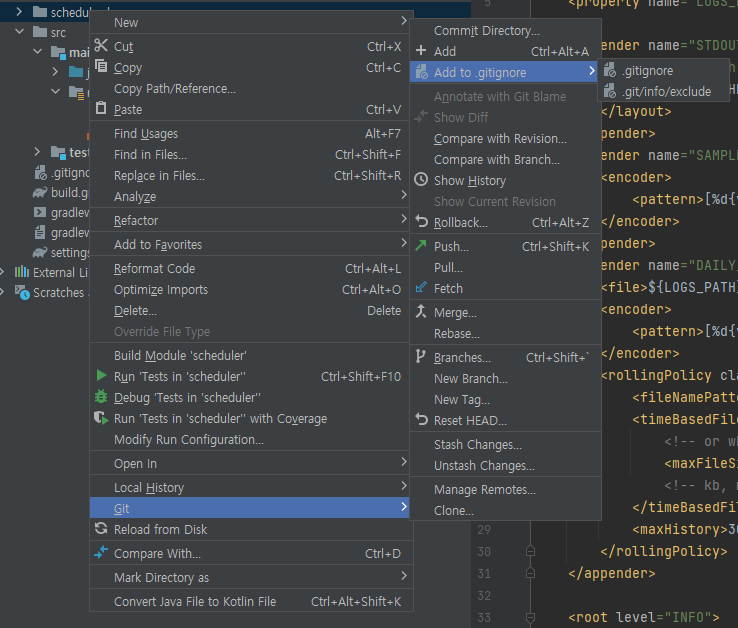
1. 폴더 또는 파일을 우 클릭
2. Git > Add to .gitignore > .gitignore
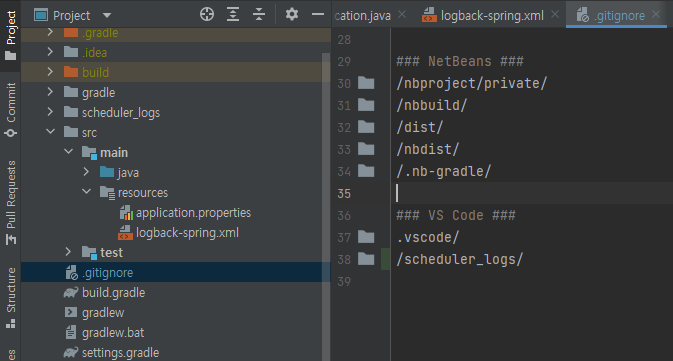
3. .gitignore 파일 확인
참고: IntelliJ 버전
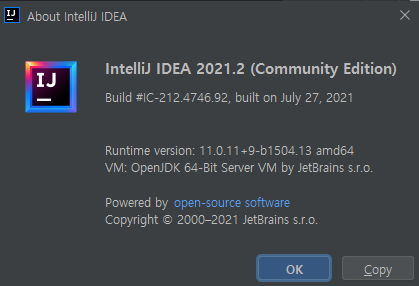
IntelliJ IDEA 2021.2 (Community Edition)
Build #IC-212.4746.92, built on July 27, 2021
Runtime version: 11.0.11+9-b1504.13 amd64
VM: OpenJDK 64-Bit Server VM by JetBrains s.r.o.
Windows 10 10.0
GC: G1 Young Generation, G1 Old Generation
Memory: 2048M
Cores: 8
Registry: debugger.watches.in.variables=false
Kotlin: 212-1.5.10-release-IJ4746.92
'JAVA' 카테고리의 다른 글
| [intellij] 선택 영역에서 치환 Ctrl + Shift + R (0) | 2021.10.06 |
|---|---|
| [JAR] 기본 Manifest 속성이 없습니다. (0) | 2021.09.02 |
| Warning: String concatenation as argument to 'StringBuilder.append()' call (0) | 2021.08.20 |
| [SpringBoot Logger] 로그 파일 생성 및 롤링 (0) | 2021.08.09 |
| [Intellij] Spring boot finished with no-zero exit value 1, [Jenkins]포트 변경 (0) | 2021.07.26 |


댓글 영역